
Your Browser is Snitching
The Hidden Reality of Browser Fingerprinting

In an era where we meticulously clear our cookies and swear by Incognito Mode, there’s a ghost in the machine that most users are completely unaware of. It’s called Browser Fingerprinting, and it’s the reason that spooky-accurate ad followed you from your laptop to your mobile, even though you never “signed in.”
If you’ve ever wondered how websites track you without a single cookie, this guide is for you. We’ll dive into how it works, why your VPN might not be enough, and how you can run a digital fingerprint test yourself.
What is Browser Fingerprinting?
Browser fingerprinting is a powerful tracking technique that websites use to collect specific information about your device and browser. By combining hundreds of tiny details — from your screen resolution to the specific version of a font you have installed — websites can create a unique “ID” for you.
Unlike cookies, which are stored on your device (and can be deleted), a fingerprint is a collection of traits about your device. You can’t “delete” your screen resolution or your graphics card’s rendering behavior.
How the Tracking Lifecycle Works
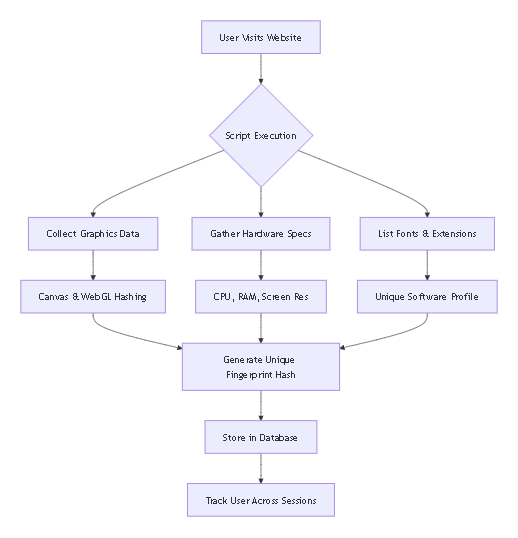
To understand the scale of this, let’s look at how a website builds your profile the moment you land on a page:
The “Big Three” Tracking Techniques
Websites don’t just ask for your name; they analyze how your computer thinks. Here are the three most common methods used today:
1. Canvas Fingerprinting
The website asks your browser to draw a hidden image. Because every graphics card (GPU) and driver renders colors and font anti-aliasing slightly differently, the resulting image is unique. Two “identical” MacBooks might produce two different Canvas hashes.
2. WebGL & Audio Fingerprinting
Similar to Canvas, WebGL tracking analyzes how your hardware handles 3D graphics. Audio fingerprinting goes a step further by checking how your sound card processes audio frequencies. These are hardware-level signatures that are virtually impossible to fake.
3. Software Complexity
Your list of browser extensions, fonts, and even your time zone contribute to your uniqueness. The more “custom” your setup is, the easier you are to track.
Why Your VPN Isn’t Stopping This
A common misconception is that a VPN or Incognito Mode stops all tracking. While a VPN hides your IP address, it does nothing to mask your browser’s fingerprint.
Think of it this way:
- IP Address: Your home address.
- Fingerprint: Your physical appearance.
A VPN puts a mask over your house (IP), but the moment you walk out (visit a site), they can still recognize you by your height, gait, and clothes (Fingerprint).
How to Test Your Own Digital Fingerprint
Awareness is the first step toward privacy. If you want to see exactly what your browser is leaking to every site you visit, you need a diagnostic tool.
The ToolKit Pro Browser Fingerprint Tool is a free, high-precision utility designed to show you exactly what trackers see.
What the Tool Reveals:
- Canvas & WebGL Hashes: See the unique signature of your graphics hardware.
- Audio Context Signature: Check if your sound card is being used to track you.
- Hardware & Software Specs: A full breakdown of the data points being leaked.
TIP
Try it now: Visit the Fingerprint Tester to see your uniqueness score. If your “uniqueness” is high, you are easier to track.
How to Stop Browser Tracking
While it’s nearly impossible to be “invisible,” you can significantly reduce your trackability:
1. Use Privacy-Focused Browsers: Browsers like Brave or Firefox (with strict tracking protection) have built-in “anti-fingerprinting” features that provide generic data to trackers.
2. Minimize Extensions: Every extension is another data point. Keep it lean.
3. Use “Standard” Window Sizes: Resizing your browser to a unique window size makes your screen resolution data point more “rare.”
4. Regularly Audit Your Data: Use online privacy tools like ToolKit Pro to stay informed about what your browser is sharing.
Conclusion: Take Back Your Privacy
The “cookieless future” isn’t about the end of tracking; it’s about more sophisticated methods like fingerprinting. By understanding how your digital signature is formed, you can take active steps to blend into the crowd.
Ready to see what you’re leaking?
👉 Run your free Browser Fingerprint Test on ToolKit Pro today!